Where to look first: the withdrawal history row
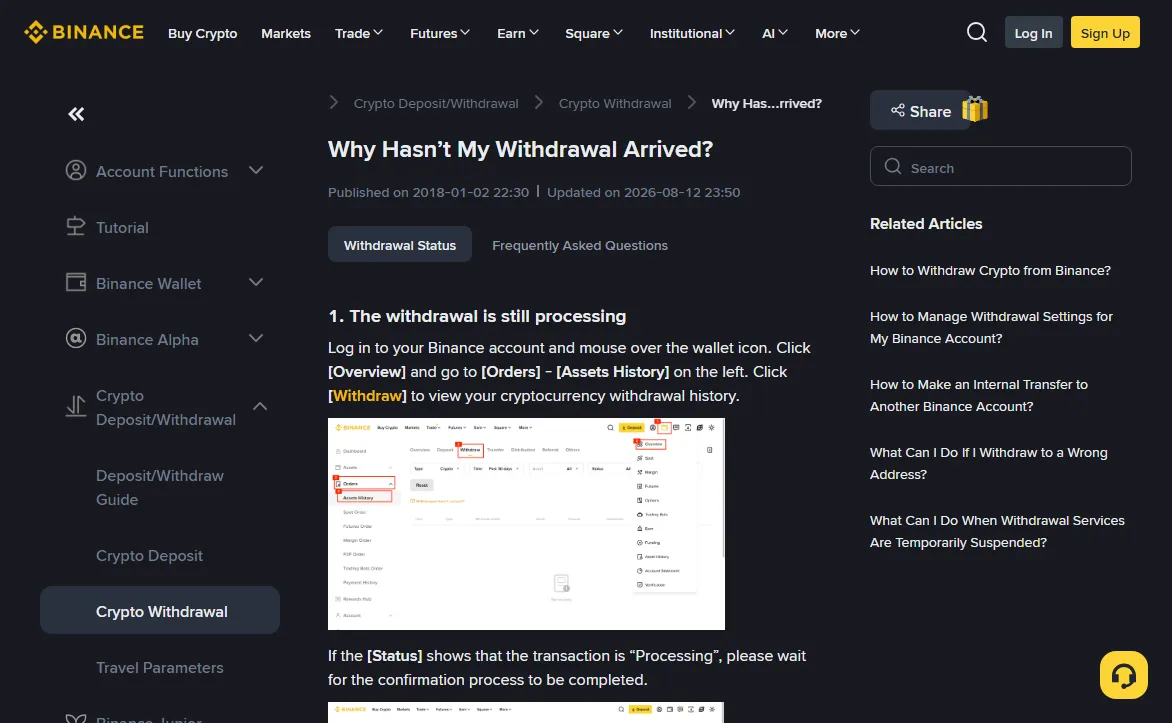
Before writing to anyone, open the one screen that tells you who is holding the problem. Binance's own help page starts there too. On the web, hover over the wallet icon, choose [Overview], then [Orders] > [Assets History] in the left panel, and click the [Withdraw] tab. Every crypto withdrawal you made is a row on that list.
Two fields on that row decide everything that follows: [Status], and whether a [TxID] has appeared. The TxID is the transaction's ID on the blockchain. No TxID means the withdrawal has not left Binance yet. A TxID means it has, and the question moves to the chain or to whoever is receiving.
2026-10
The help page only describes the website route. App menus move between versions and the page does not spell out an app path, so neither does this article. If you cannot find the list on your phone, log in through a mobile browser and follow the route above.
Binance withdrawal stuck on "Processing" with no TxID
At this stage the coins are still Binance's to send. According to the help page, a TxID is typically generated within 1–30 minutes, and its appearance means Binance has broadcast the transaction. No TxID means the withdrawal has not left Binance.
One thing worth checking while you wait is the announcements page, specifically wallet maintenance notices. Binance says system upgrades and technical issues can delay withdrawals, and that these are usually announced. If the network you picked is under maintenance, a support ticket will not bring it back sooner.
The help page gives a clear point at which to escalate: no TxID after 6 hours. At that point contact Binance Support and attach a screenshot of the withdrawal history row. Make sure the screenshot shows the coin, amount, network, time and status.
There is a TxID, but the explorer says unconfirmed
Clicking the TxID opens the transaction on a block explorer for that chain: Etherscan for Ethereum, Tronscan for Tron, and so on. The explorer shows whether the transaction is confirmed and how many confirmations it has.
In the help page's example, once the transaction is created and until it is confirmed, the amount is temporarily frozen: not yet with the receiver, and not usable on your side. How long confirmation takes depends on two things. One is how fast the chain produces blocks. Binance lists rough per-block times on the help page: BTC about 10–60 minutes, ETH about 5, BNB about 3, TRON about 3, all longer when the network is congested. The other is how many confirmations the receiving side demands before it credits you. In Binance's own example, a BTC withdrawal to a wallet that wants 2 confirmations usually takes about 20 minutes.
That second number is set by the receiver, not by Binance, and it differs between platforms. Look it up on the receiving exchange's deposit page or help centre instead of assuming. Until the count is reached, the only useful thing to do is keep the TxID handy and refresh the explorer now and then.
Status says "Completed" and the explorer confirms it, but nothing arrived
Binance's help page is blunt here: once the explorer shows the transaction confirmed, the funds have left successfully and Binance is unable to provide any further assistance. You need the owner or support team of the destination address. The ball is on the receiving side now.
Before you write to them, check the three things the help pages keep pointing at:
- Network. Is the network you withdrew on listed on the receiver's deposit page? If not, this is a wrong-network case, and whether it can be fixed depends on the receiving platform. The options are laid out in the chain-choice article.
- Memo or tag. Some assets need one when deposited to an exchange; Binance's examples include XRP, XLM, EOS and ATOM. Without it the coins land on the exchange's shared address with nothing to say they are yours. Binance's guidance: contact the receiving platform, which in most cases can locate the funds using the TxID. Binance cannot recover funds sent without a memo to an external platform.
- Address. Open the TxID on the explorer and compare the recipient address with the one currently shown on the receiver's deposit page, first and last characters at least. An address saved months ago may no longer be the one they credit.
If all three check out, open a ticket with the receiver and bring: the TxID, coin and amount, the network, the destination address (plus memo if there was one), and the confirmation time shown on the explorer. How quickly they answer is up to them.
The withdrawal never went out: an error at submit, or withdrawals paused
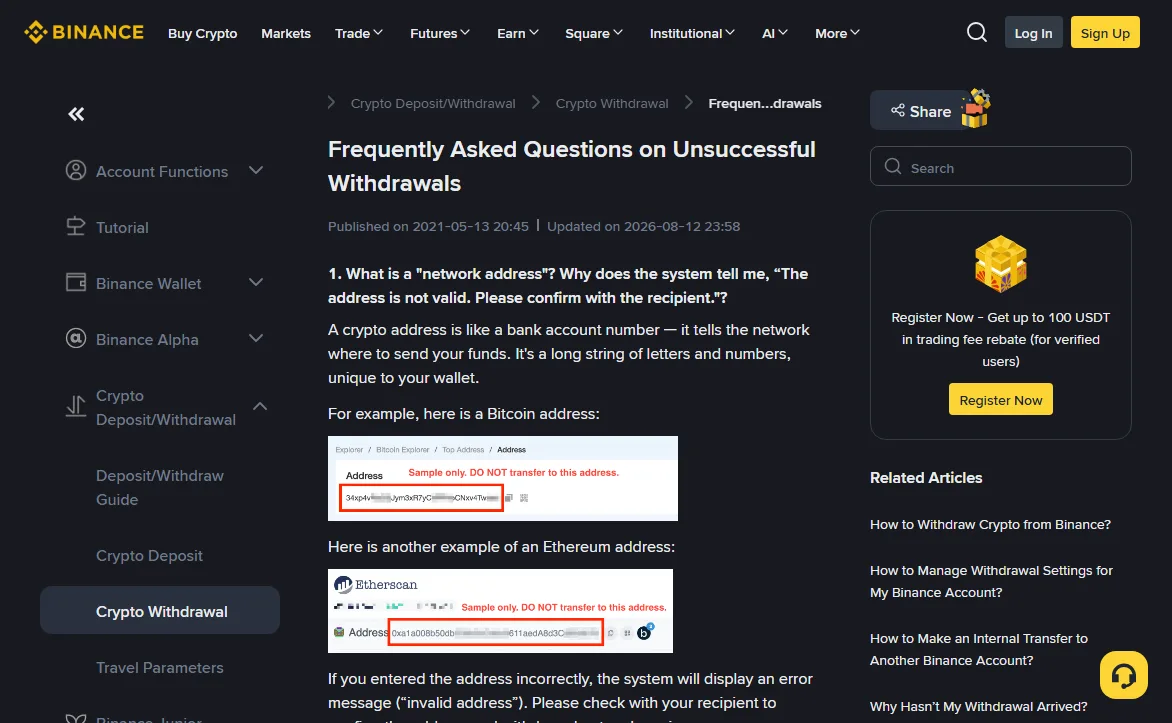
Sometimes "not arrived" really means "never sent". The request was blocked when you submitted it, or there is no row in the history at all. Binance's FAQ on unsuccessful withdrawals covers the usual messages, and each one points somewhere different.
2026-10
"The address is not valid. Please confirm with the recipient."
The address does not fit the network you picked, so the system stopped it before it went anywhere. Get the address again from the receiver and ask which network it is for. Binance's page asks you to paste or scan addresses, never type them. Our address format checker runs a similar format check before you submit.
"The memo is not valid"
What you entered does not match the memo format for that coin; the help page lists formats, for example numbers only for XRP. If you are not sure, ask the receiving platform rather than guessing.
"Network busy"
Binance says this is not a problem with your account: the blockchain itself is overloaded. Its two suggestions are to wait 15–30 minutes and try again, or to switch networks if the receiving platform supports the other one. Do not skip that condition. Check the receiver's deposit page before switching.
The withdraw button is greyed out, or the page says suspended
Binance's page on suspended withdrawals gives three causes: wallet maintenance; a problem with that specific asset, usually a network upgrade, where the page shows an estimated recovery time and a [Set Reminder] button; and your own account's withdrawal function being temporarily disabled. The last one often follows a security change. Resetting two-factor authentication is one example, and the lockout article covers what Binance says about how long that restriction lasts. Here you are waiting out an account restriction rather than a blockchain, or following Binance's own reactivation steps.
Which row are you in? Who to contact and what to bring
| What the history shows | Who has it now | What to have ready |
|---|---|---|
| Processing, no TxID, under 6 hours | Binance, still sending. Check wallet-maintenance notices | Nothing yet |
| Processing, no TxID after 6 hours | Binance Support | Screenshot of the history row |
| TxID present, explorer shows unconfirmed | The blockchain. Also check how many confirmations the receiver needs | The TxID |
| Completed, confirmed on the explorer, not credited | The receiving platform or wallet | TxID, network, address, memo if any |
| Error at submit, or withdrawals suspended | You, reading the exact message; or a maintenance or account restriction | The exact wording of the message |
The third row is the easiest one to skip past. A hash on the explorer can look like "done", but if the receiver wants more confirmations than the chain has produced so far, there is nothing yet for them to credit.
Sources
- Binance Support, Why Hasn't My Withdrawal Arrived? (marked updated 2026-08-12, read 2026-10). The history path, what Processing and Completed mean, TxID typically within 1–30 minutes, the per-block confirmation times, no further help from Binance once confirmed, and the 6-hour point for contacting support with a screenshot.
- Binance Support, Frequently Asked Questions on Unsuccessful Withdrawals (marked updated 2026-08-12, read 2026-10). The invalid address, invalid memo and network busy messages, and the statement that Binance cannot recover funds sent to an external platform without a memo.
- Binance Support, What Can I Do When Withdrawal Services Are Temporarily Suspended? (read 2026-10). The three causes: wallet maintenance, an asset-level suspension, and the account's withdrawal function being disabled.
Every time figure in this article (1–30 minutes, 6 hours, 15–30 minutes, the block times) is quoted from these three pages. Binance can change them; the help pages are the place to recheck before you act.
Short answers
Where is the money while the withdrawal is pending?
In the help page's example, after the transaction is created and while it is still unconfirmed, the amount is temporarily frozen. It is not yet with the receiver, and you cannot use it on your side either.
Binance says it cannot help after confirmation. Does that mean the funds are lost?
No. It means the transfer succeeded on the chain and the next step belongs to whoever controls the destination address. For a missing memo, Binance's own page says the receiving platform can usually find the deposit using the TxID.
Does a network busy message mean my account has been flagged?
Binance's FAQ says it does not: the message means the blockchain is overloaded. Wait 15 to 30 minutes and retry, or use another network that the receiver also supports.