Binance deposit not showing yet: count the confirmations
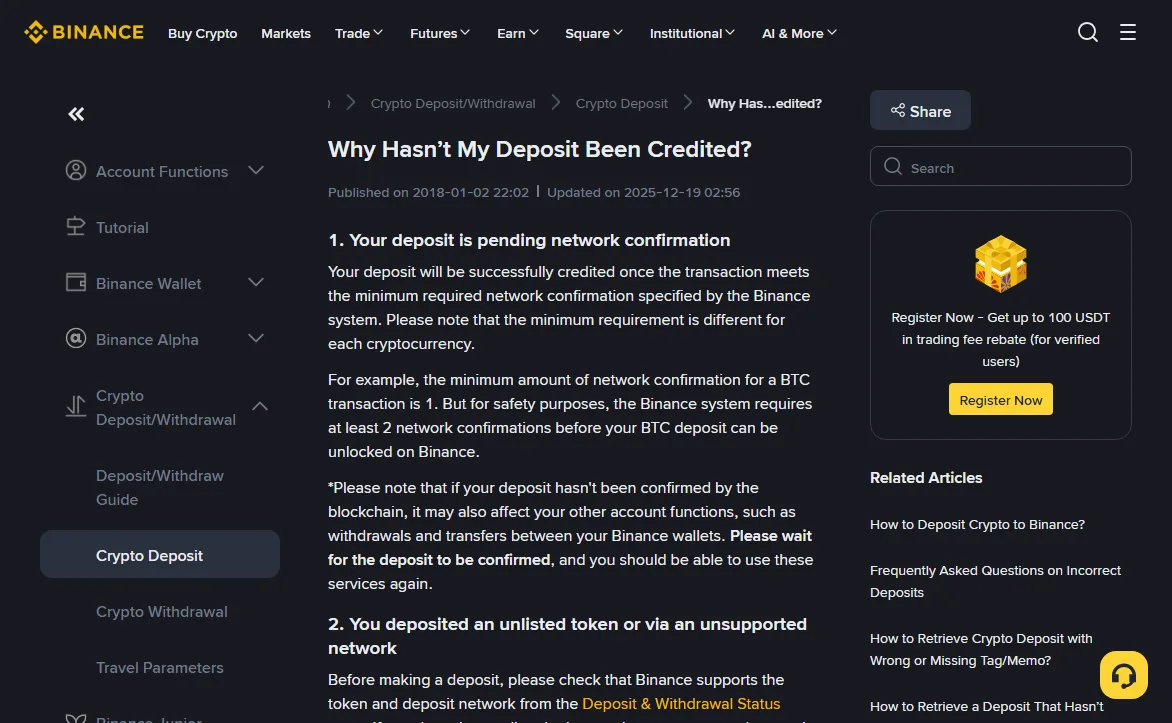
The sending platform says the withdrawal went through, and your Binance balance hasn't moved. Before anything else, check whether the deposit has simply not reached the number of network confirmations Binance wants. It is the first reason on Binance's own "Why Hasn't My Deposit Been Credited?" page, and the least worrying one.
The page's BTC example shows the gap. One confirmation is enough for the transaction to exist on the chain, but Binance waits for at least two before it unlocks a BTC deposit. An explorer showing "1 confirmation" and a credited balance can be one block apart.
2026-10
There is a side effect on the same page that catches people out. While a deposit is unconfirmed, withdrawals and transfers between your Binance wallets may also be affected. If you were waiting for this USDT to land so you could send it on, and the withdraw button won't cooperate, that's likely why. It clears once the deposit confirms.
The place to look is the sending side. Find the TxID in the other platform's withdrawal history and open it in a block explorer. If it reads unconfirmed or failed, Binance can't do anything with it. The self-service recovery page says so in as many words and sends you back to the platform you withdrew from.
The five reasons Binance lists, sorted by whether there is a way back
Confirmations are reason one. The other four look similar from the outside and end very differently.
Wallet maintenance
Deposits on that network pause during maintenance. The funds are on the chain; crediting waits until maintenance ends. Nothing to file.
Missing or wrong memo or tag
Coins like XRP and TON need a tag or memo when sent to an exchange. Without it the funds reach a Binance address but can't be matched to your account. The reasons page warns this "might result in the loss of funds", yet the recovery page points to a separate route for exactly this case, plus a checker where you paste the TxID to see whether that route applies. Why memos go missing in the first place is covered in the memo section of the network guide.
An unlisted token, or a network Binance doesn't support
Here the two official pages pull in different directions. The reasons page says the assets "might be lost and cannot be recovered". The recovery page then lists exceptions: some unlisted tokens qualify for Smart Retrieval, which shows up in your deposit history with the status "Wrong Deposit" and a [Retrieve now] button, and there are application types for unlisted tokens on supported networks and for tokens sent over unsupported EVM networks. Read together: there may be a route, and there is no promise. Checking the Deposit & Withdrawal Status page before sending is far cheaper than any of these.
Below the minimum deposit
The reasons page only says the crypto "won't be credited" and tells you to check the minimum on the deposit page first. None of the recovery types in Binance's table is named for this case, so the self-service form isn't the obvious door. Ask Binance Support, with the TxID ready.
Four conditions before self-service recovery will look at it
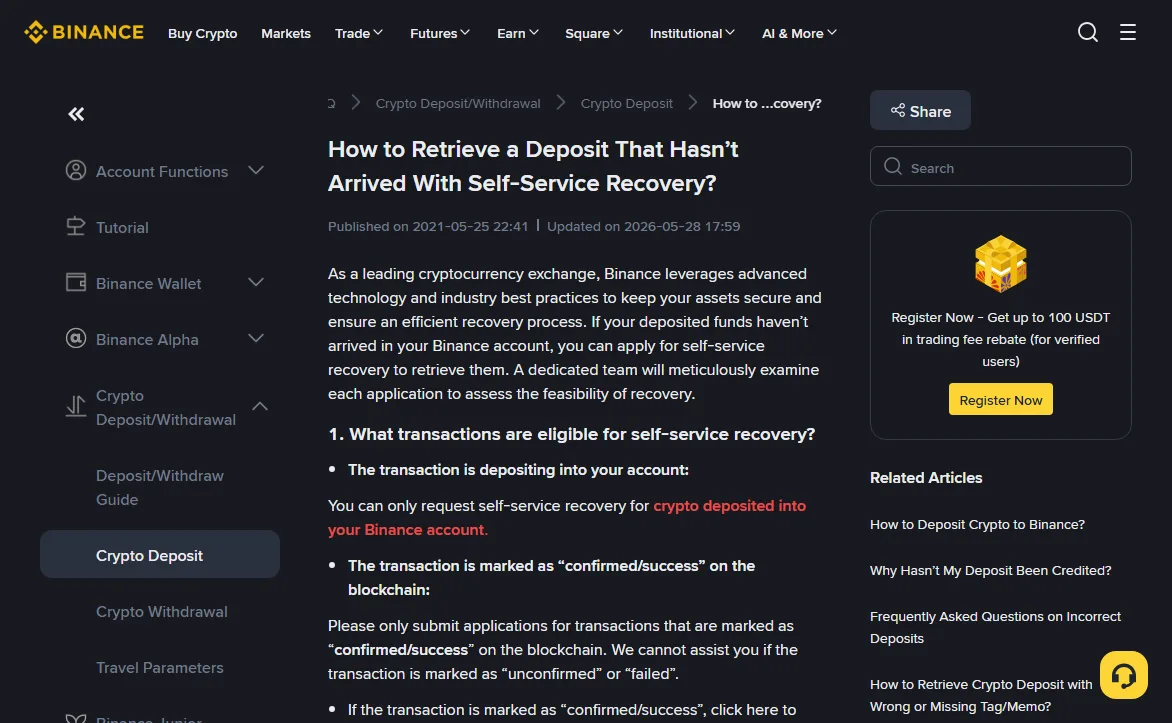
The self-service recovery page (marked updated 2026-05-28) is strict about who can apply. Go through these before you start the form:
- The deposit went into your own Binance account. If you sent funds to someone else's Binance account and they say nothing arrived, you are the sender and can't apply. Only the account that should have received it can. Applying on someone's behalf is also excluded.
- The chain marks it "confirmed/success". Unconfirmed or failed transactions are out of scope.
- At least an hour has passed. The page says to apply when funds still haven't arrived one hour after the deposit.
- It is a deposit, not a withdrawal. A Binance withdrawal sent to a wrong address has already left Binance; recovery can't reach it. The outgoing side is covered in Binance withdrawal not arrived.
2026-10
Filling in the recovery form without getting rejected
Log in, open the recovery link from that page, paste the TxID and click [Submit]. If Binance already has the transaction on record, the coin, network, your Binance deposit address and the amount fill themselves in for you to review. If it doesn't, you type them, and three fields come with instructions:
- Coin: use the full ticker. The page's example is "sUSD", not "USD". If it isn't in the list, type it and click [Confirm].
- Deposit address: the "to address" from the explorer. Some chains label it "destination address" or "receiver". It is not the address you sent from.
- Amount: exactly what the chain shows, up to 8 decimal places, with every thousands separator removed.
Progress shows under [Application Records]. Binance may ask for more, such as a short video proving the deposit is genuine. If the deposit is actually another platform returning a failed withdrawal, you'll need records between you and that platform that include the TxID. For outcomes that are refunds, double-check the address the funds go back to, and add a tag or memo if that coin needs one.
Most rejections listed on the page are typing problems: a TxID and address that don't match, an amount that differs from the chain record. Copy and paste both instead of typing them. The rest are situations where there was nothing to recover: the funds had already arrived, the transaction wasn't confirmed or couldn't be found, or the chain shows an amount of zero.
How many working days, what it costs, and whether you get a credit or a refund
The page's FAQ includes a table by recovery type. The last column matters more than it looks: in most cases the result is a refund sent back out, not a credit to your Binance balance. As listed on the page:
| Type (Binance's wording) | Outcome | ETA | Fee |
|---|---|---|---|
| Deposit not credited | Credit | 5 working days | Free |
| Deposit to hot wallet | Refund | 5 working days | Free |
| Deposit old/delisted tokens | Refund | 5 working days | Network withdrawal fee |
| Deposit without or wrong MEMO | Refund | 7 working days | Network withdrawal fee |
| Smart retrieval | Refund | 7 working days | 1 USDT |
| Deposit restricted | Refund | 14 working days | Network withdrawal fee |
| Unlisted tokens on supported networks | Refund | 30 working days | 20 USDT |
| Listed or unlisted tokens on unsupported EVM networks | Refund | 30 working days | 20 USDT |
| BNB Pioneer Burn | Refund | 30 working days | 20 USDT |
Read the small print under it as part of the table. The clock starts when Binance has received the required information and the fee, not on the day you submit. Actual completion can take longer. Fees are "subject to change and not fixed". And the page states plainly that recovery isn't guaranteed and the table is not a binding commitment.
Sources
- Binance Support, Why Hasn't My Deposit Been Credited? (marked updated 2025-12-19, read 2026-10). The five reasons: pending confirmation (BTC needs at least 2 before unlocking), unlisted token or unsupported network, wrong address or memo, below the minimum deposit, wallet maintenance; and the effect of an unconfirmed deposit on withdrawals and wallet transfers.
- Binance Support, How to Retrieve a Deposit That Hasn't Arrived With Self-Service Recovery? (marked updated 2026-05-28, read 2026-10). Eligibility and exclusions, the one-hour point, the form fields, extra evidence, rejection reasons, the ETA and fee table, and the statements that fees are charged only on success and recovery is not guaranteed.
Short answers
My friend sent USDT to my Binance account and it hasn't arrived. Who applies?
You do, as the owner of the receiving account. Binance's recovery page excludes applications from the sender and applications made on behalf of someone else.
Is there a fee if the recovery fails?
According to the recovery page, no. Fees are collected only when retrieval succeeds, and the amount shows under your application in Application Records.
The deposit went to Binance on a network it doesn't list. Is it gone?
Not necessarily, but nothing is promised. The reasons page says such deposits might be lost, while the recovery page offers Smart Retrieval for some unlisted tokens and a 30-working-day route for unsupported EVM networks, with a 20 USDT fee if it succeeds.